 | Active TopicsSearchRegisterLogin |
| WIP (Work In Progress) | |
 Pixel Joint Forum : Pixel Art : WIP (Work In Progress) Pixel Joint Forum : Pixel Art : WIP (Work In Progress) |
 Topic: Wine Glass Transparency Topic: Wine Glass Transparency |
  |
| Author | Message |
|
thetallwalker
Seaman 

Joined: 15 April 2021 Online Status: Offline Posts: 6 |
   Topic: Wine Glass Transparency Topic: Wine Glass TransparencyPosted: 18 January 2015 at 10:53pm |
|
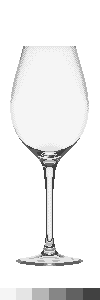
Pixeled a wine glass off of this reference. Next tried to change it to transparencies so it would look like a glass in front of any background and such, having trouble though. Any suggestions to improve the look of the transparent one? I want it to look good with the grey pixel joint background behind it, not just the white one I have. Or should I instead just stick with the one with the white background? The pallets are slightly different, as the one with transparencies has a strictly even step and the light end is lower.
  |
|
 IP Logged IP Logged |
|
|
PixelSnader
Commander 

Not a troll! Joined: 08 January 2026 Online Status: Offline Posts: 3194 |
Posted: 19 January 2015 at 12:30am |
|
While many purists would consider this an affront to pixel art due to the use of alpha transparency, I quite love it. So to pre-empt any haters; I'm giving you a digital high-five right now. You do you.
Transparent/translucent objects, clear glass in particular, are hard to do in pixel art because you can't predict what will be behind the object, so how in god's name are you supposed to pixel those it? This is the reason why glass in sprites is generally avoided, and why most pixel art of transparent objects is based on external/front reflection and internal reflection/refraction. But this has limits. For example, it only works decently with somewhat turbid materials. If you try the same techniques for crystal clear glass it will invariably look weird and a bit flat. Even with transparent pixels you only have a limited reach; 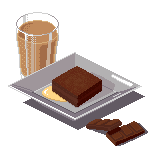
This works okay-ish because there is very little transparency (drinks are generally turbid. Opaque in this case even) and there are no soft gradients, just a small harsh highlight. Images like yours are impossible in pixel art unless you know the background, or if you break 'rules' like this. However. It does lack some finesse. Of course there's a lack of anti-aliasing to keep things smooth, and I think there's too much dithering... but the biggest issue is this:  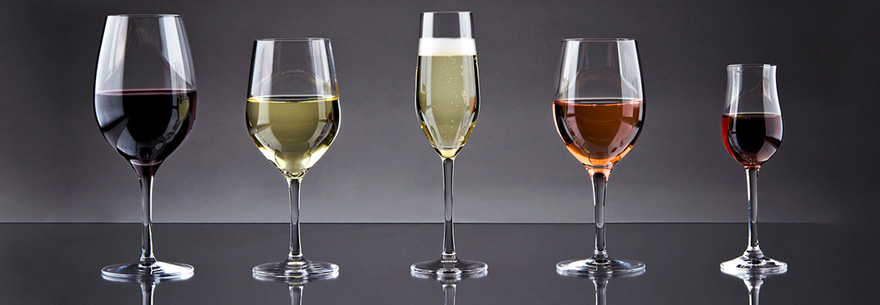
I don't think I even have to write anything down to explain the difference, do I? You've got the alpha transparency, so use it. |
|
|
▄▄█ ▄▄█ ▄█▄ ▄█▄ |
|
|
IP Logged |
|
|
thetallwalker
Seaman
Joined: 15 April 2021 Online Status: Offline Posts: 6 |
Posted: 20 January 2015 at 3:01pm |
|
For how often I see qualms about alpha transparencies I had to check the submitment rules just to make sure it was ok first, cause I was rather worried anything outside of using it for the background wouldn't be allowed. I've been blind, but as you point it out there is certainly too much dithering. No explanation needed, I will take your comments and hopefully with some work something good will come out!
|
|
|
IP Logged |
|
|
Bcadren
Commander

Joined: 07 June 2013 Online Status: Offline Posts: 53 |
Posted: 29 January 2015 at 9:29am |
|
I got to thinking heavily about this issue yesterday. Part of the reason you don't really see much near-transparent objects in pixel art (such as your glass); is that in an object such as that you only actually see two things:
1.
Because of those two factors it doesn't make sense to use nominal transparency in an irregular glass object; such as these glasses. It'd easily work for something, like a stained-glass window, where you see some of the color form the object and view the background through it without any refraction; BUT it wouldn't work for this glass. At least without it being baked to a specific lighting pattern (specular) and a specific background (refraction). However; it's not impossible to make such a thing work with pixel art; it's just non-traditional techniques. IE; have to design and create a 'map' layer that understands how the pixels behind the glass object should defract and code a custom renderer (or GIMP layer effect script) to do this effect. IE: KIND OF like what I did here (though that's a traditional Normals Map done in sprite; not a new map unique to a new problem). I need to solve this problem myself for an isometric pre-rendered game I'm working on. So...if you don't mind, may I edit on your piece as a testwork? |
|
|
IP Logged |
|
| |
||
Forum Jump |
You cannot post new topics in this forum You cannot reply to topics in this forum You cannot delete your posts in this forum You cannot edit your posts in this forum You cannot create polls in this forum You cannot vote in polls in this forum |
|
