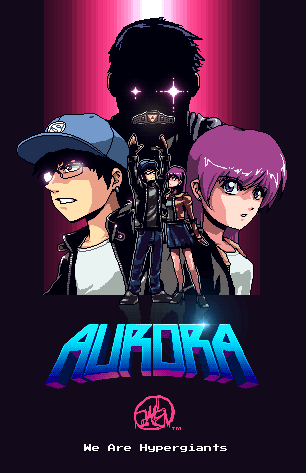
Aurora MV poster
Printed From: Pixel Joint
Category: Pixel Art
Forum Name: WIP (Work In Progress)
Forum Discription: Get crits and comments on your pixel WIPs and other art too!
URL: https://pixeljoint.com/forum/forum_posts.asp?TID=14890
Printed Date: 09 June 2026 at 3:44am
Topic: Aurora MV poster
Posted By: Halffish
Subject: Aurora MV poster
Date Posted: 10 August 2012 at 2:20am
|
This is pretty much in its final stages (going to be public soon). Some constructive feedback would be highly appreciated! I did "cheat" a bit on the glows, but other than that, they are several pieces combined artwork.
Original: 
Current: (100% pixels) 
|
Replies:
Posted By: Halffish
Date Posted: 10 August 2012 at 1:39pm
| Sorry I realized the link wasn't working. Should be now... |
Posted By: Yuran
Date Posted: 10 August 2012 at 1:59pm
|
The girl's breasts must be lower
Two characters in the center too fractional and lost at the same fractional background. You can try to identify them using some sort of aura that they fence off from the general background. Or use are not as sharp contrasts of light and shadow Два персонажа в центре слишком дробные и теряются на таком же дробном фоне. Можно попробовать выделить их используя какой нибудь ореол, который отгородит их от общего фона. Или используй не такие чёткие контрасты света и тени |
Posted By: Halffish
Date Posted: 10 August 2012 at 2:00pm
| the standing or portrait -- i assume its the portrait XD |
Posted By: Yuran
Date Posted: 10 August 2012 at 2:10pm
|
And in this case, she will be higher of this guy :)
You can keep her torso in place, and the whole picture up above XD |
Posted By: Halffish
Date Posted: 10 August 2012 at 2:16pm
| Elongate the torso of the girl compared to the guy XD |
Posted By: Yuran
Date Posted: 10 August 2012 at 2:23pm
| glitters of glass, "R" and terrible eyes - oll are have /GPG effect of deading the whole pixel art style |
Posted By: Halffish
Date Posted: 10 August 2012 at 2:30pm
|
so remove the non-pixel glows, the characters are too busy and its hard to make out the to figures in the center, possibly do to the contrast.
|
Posted By: Yuran
Date Posted: 10 August 2012 at 2:45pm
CUT and PASTE and correct some contrast accents in senter |
Posted By: Halffish
Date Posted: 10 August 2012 at 4:19pm
|
Thank you for the direction :)
I didn't have time to fix it for the poster release, but I'll definitely edit it for the animated portions. |
Posted By: Halffish
Date Posted: 14 August 2012 at 3:45am
|
Here is an update with some pixel pushing and pixel-formed flares. Tweaked the background color to separate the foreground objects a little more.
77 colors. 
|
Posted By: Yuran
Date Posted: 14 August 2012 at 9:52am
|
Try to repeat the same effect on the brilliance of glass glasses guy, I think it's not hard to do.
Umm ... Because the background color is indigo, the whole picture seems like a fog or smoke |
Posted By: Halffish
Date Posted: 14 August 2012 at 3:28pm
|
|
Posted By: Yuran
Date Posted: 14 August 2012 at 3:36pm
| Eah! Look is great! |
Posted By: Halffish
Date Posted: 14 August 2012 at 3:40pm
| Thank u for all your help kind sir! |