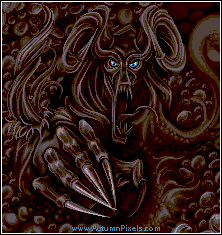
Nightmare :: Pixel Art Detail

More from the GalleryMore pixelart
Random Unrated Pixel ArtRandom pixelart

Nightmare

Nightmare


You need to be logged in to rate pixel art.

Pixel Art Details


Title: Nightmare
Pixel Artist: Jaeden  (Level 4 Team Leader :: 3962 points)
Posted: 7/15/2008 9:24:23 PM
Palette: 15 colors
Statistics: 7 comments :: 10 favorites :: 0 avatars

Originally started for a Pixeljoint challenge but I never finished it, Then it started to get bigger but I got real unhappy with the pallet development, so Im cropping it and leaving it like this.

The keeper of Nightmares.

15 colors - MSP

Looks ALOT better on a dark background.

  More pixelartMore from the Gallery  More pixelartMisc  

What do you think?

If you would like to comment you will need to be logged in.
Register now. It only takes a moment and it's free!


Raku (Level 2 Hired Gun) at 7/18/2008 3:31:31 AM
I love how it is made keep it up
this version is way better for me

Jaeden (Level 4 Team Leader) at 7/16/2008 11:05:09 AM
 
Arachne - Love the depth edit hehe, To be completely honest, i just got sick of it. Id love to get around eventually to AAing it but I lost interest. I may revisit this sometime when I feel motivated.
 
*edit*
 
WHY AM I ALWAYS CURSED WITH VERTICAL TEXT?!

big brother (Level 9 Rear Admiral) at 7/16/2008 11:03:41 AM
It'd be nice if you gave it more depth. Right now it looks like the hand and the face are on the same visual plane.

Rose (Level 1 Rookie) at 7/16/2008 10:50:49 AM
Intensely cool!

Arachne (Level 4 Murderer) at 7/16/2008 10:09:58 AM

Very cool.  I like the design. I'm not sure if the lack of AA works, though. Maybe if your lines were smoother to make it seem more controlled and less sketchy. You're also using thick outlines to separate elements rather than using light and shadow, which makes it look very flat. Everything gets the same priority and it looks cluttered. The consistent use of black everywhere, the background, which is just as bright as the beast, and the bright outlines also flatten the image. I think maybe brightening or darkening outlines on things depending on where they are in relation to the viewer might help, but the things themselves will still appear flat.

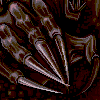
Here's an example of how you can get certain elements to have priority over others. I would make the face and the hand focal points, which means toning down the surrounding areas.

It's very nice to see that you can draw more varied things and draw them well. I hope to see more creatures from you in the future.


macula (Level 6 Hitman) at 7/16/2008 8:47:07 AM
Wow cool piece.

Ndsfreak (Level 5 Soldier) at 7/15/2008 10:00:30 PM
Damn it, it really does give you nightmares.

Google
 

Keywords

The following keywords are used to help with the Pixel Joint search tool and to help search engines with appropriate key phrases. Make sure to take some time and add keywords to your pixel art submissions. It actually helps!
jaeden jae autumn pixels nightmare dream, Nightmare avatars, Nightmare icons, Nightmare pixel art, Nightmare forum avatars, Nightmare AOL Buddy Icons

Report Problem

If you are going to report an issue with this piece please provide relevant URLs/Images to back up your claim.
  • Pixel art is ripped
  • Piece is not pixel art
  • Misc issue with pixel art
  • Issue with artist
  • Register

    If you would like to be a team player why not register? It's quick and easy and you'll be able to comment on, rate and upload pixel art.

    Already Registered?

    User Name:
    Password:
     

    Register | Retrieve Password

    Donate

    Want to give some dough back to all those amazing pixel artists?

    Pixel Art Links