Digger :: Pixel Art Detail

More from the GalleryMore pixelart
Random Unrated Pixel ArtRandom pixelart

Digger

Digger


You need to be logged in to rate pixel art.

Pixel Art Details


Title: Digger
Pixel Artist: big brother  (Level 9 Rear Admiral :: 34794 points)
Posted: 2/19/2009 10:17:31 AM
Palette: 16 colors
Statistics: 63 comments :: 130 favorites :: 0 avatars

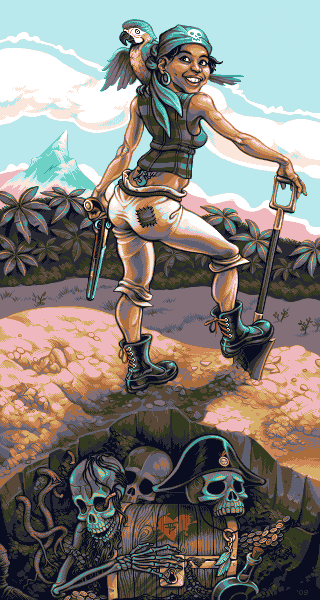
"What, you thought the captain buried the treasure?"

I wanted to depict a large scene using a small, unified palette. It's comprised of two intersecting color ramps: one warm and one cold. I emphasized the almost musical rhythm rippling through each horizontal stripe in the composition. The image also plays with contrasts of color, shape, texture, and emotion (vitality versus decay).

As for subject matter, I draw from my own experience, as always.

Here are the images I used for reference:
http://www.herculeaneffort.com/upload/diggerreference.jpg

This is the original sketch that I drew for this piece:
http://www.herculeaneffort.com/upload/bigbrotherdiggersketch.png

EDIT: For some odd reason, the colors don't appear as they should outside of Photoshop on my monitor. If the mid-blue shade looks particularly harsh, try opening it in Photoshop to see it how I intended.


Top Pixel Art - February 2009 (#3)Top Pixel Art - February 2009 (#3)

  More pixelartMore from the Gallery  More pixelartScenes  

What do you think?

If you would like to comment you will need to be logged in.
Register now. It only takes a moment and it's free!


wenruto (Level 1 Rookie) at 6/7/2009 12:52:47 PM

WOOOOOOOW t..that's awesome


Gothdrop (Level 1 Depressed) at 4/1/2009 10:34:24 PM

 Like wow... seriously *faints*


joeC (Level 1 Private) at 3/15/2009 7:30:20 PM

racist! Nahhh but srsly dude nice job


PanicBomber (Level 5 Killer Klown) at 3/15/2009 1:30:39 PM

there is something that bothers me in this pic, i just dont know what that is hmm.. but i have to rate 5/5 cause its so well done!


smk (Level 5 Sniper) at 3/15/2009 9:15:23 AM

Really nice usage of the colors at hand :) The picture itself reminds me of the Monkey Island series :)


bricl (Level 1 Depressed) at 3/15/2009 2:00:22 AM

wow! i could hardly beleive this was a pixel peice.


big brother (Level 9 Rear Admiral) at 3/10/2009 12:14:03 AM

Yeah, there are some anatomical errors. I sacrificed a few things for the sake of the composition. It originally was supposed to be shot at a more downward angle or fisheye-type lense. That accounts for her shortness and large head to an extent. You'll notice the vertical wave through her: how her leg pulls her wide, then back to the narrow waist, then up and out through the arch of her back. I wanted this ripple to contrast against all the vertical movement in the horizontal stripes.

I'd be worried that making her back more realistic might soften the "ripple". Also, it'd cramp the negative space between her torso and her left arm.


Arachne (Level 4 Murderer) at 3/7/2009 9:27:25 AM
I really like this. Very polished, and interesting use of colors. Her back seems to bend much too sharply, though. I think making the angle 130 degrees or so (with the corner where the bottom of the fold is) would have made it look more natural. Otherwise, definitely one of your best pieces.

kingpyfiou (Level 1 Rookie) at 2/25/2009 11:29:29 PM

强人,学习。!!!


CrocStock (Level 1 Rookie) at 2/24/2009 2:13:26 PM

 Wow, the scene is unbelievable and the limited colours makes this piece even more impressive!  


alkaline (Level 6 Yonkyu) at 2/23/2009 9:49:15 PM

love this piece, especially the neverending details at the bottom. you really know how to work in those details, and with great understanding of colors too.


Fool (Level 6 SWAT) at 2/22/2009 6:47:09 PM
I recall same problem, colors appeared different in photoshop as well after saving in gif/png formats. Had to load it in GG and tweak it on a right place.

Joshr_691 (Level 4 Mercenary) at 2/22/2009 1:20:56 AM

Very well done, I love it!


Dex (Level 11 Psychopath) at 2/21/2009 8:01:29 PM
Haha, of course it'll look better. (Not that the other one didn't, haha. :D)

Also I'd like to say that the blue looks perfect on my monitor, and when clicking your other link, there was no difference whatsoever. Still, even if the color is off a bit, this is still great...!

ui_ (Level 1 Rookie) at 2/21/2009 2:23:49 PM
Yah, ptoing comment is accurent. But the "main problem" with that (well not really a problem but..), back in the old days and actually, is, each monitor use his ""OWN profile"" of color or his own way to show a profile. And  you will noticed some little difference between monitors, specially if you jump to normal old monitors to lcd. And a plus, remember than each monitor have his own configuration as, color/hue/bright/contrast, etc.... So when you saw the same art in other monitor obviosly you will noticed than the colors are wrong or a little bit difference.

I recomend you to add the profile of your monitor (as you did) in photoshop or whatever tool, and after that try to  export as gif/png/bmp or whatever format (i personally recomend png). And then you just decide what color is more accurent to your art :D.

about the new colors, i see the mountain middle color (that blue on the middle), its more bright (in my monitor), and the face of the girl and part of his body are a little darkness now, and part of the ground too. Im just comparing boths in my computer, but nothing too drastic.

Anyway been honest you can spend a lot of time trying to make the art looks "the same" in each monitor/profile or whatever format, but at the end it really depend of what you looking in the art and your the only one who can decide when something is wrong and when somethign is good :P. For me the art is good actually :D. But maybe my eye/brain experience is smaller than yours. (sorry for the long respond)

strangles (Level 1 Rookie) at 2/21/2009 5:50:54 AM

Have you got the progres animation of this piece?  :)


big brother (Level 9 Rear Admiral) at 2/21/2009 12:54:04 AM
I think ptoing's right about the PS color profile. I tried converting the image to my monitor profile (Cintiq) and manually readjusting the palette to closer resemble what I intended. Here's the result:
http://www.herculeaneffort.com/upload/bigbrother_digger2.gif
When I view the above link, it appears (outside of Photoshop) with colors very close to those of the old file (in Photoshop).

I suspect that the original shows up as I intended for everyone else; it just has to do with my monitor. Let me know if there's a huge difference between the colors here and those in the link.
Dex: I haven't forgotten about updating the platform mockup. I've made some changes to it, and I'll hopefully be able to revamp the whole thing when things are less busy. The "post-crit" version will definitely look better than the one in my gallery!

ptoing (Level 7 Underboss) at 2/20/2009 10:05:29 PM
I reckon it has to do with the PS colour profiles. So you could set it to monitor colour when you work on pixelart that is meant only for the screen anyway. That should then display nonaltered colours within PS afaik.

Dusty (Level 1 Rookie) at 2/20/2009 9:31:07 PM
I'd say don't use GIF at all, given potential color problems. Just use PNG.

j.negrón (Level 1 Thug) at 2/20/2009 6:24:07 PM

excellent work, you are an artist; the colors looks different, but man this is brilliant!


Peach (Level 5 Soldier) at 2/20/2009 3:02:52 PM
what a pity about the color issue :( is there something wrong with your color profiles?
if it is as ui_ said you should try to convert to indexed before exporting, at least in GIMP gives the best result and the optimal control over colors.
anyway great piece +faved!

Ky3bMu4 (Level 7 Assassin) at 2/20/2009 12:52:13 PM
To the top!

Slemsvamp (Level 6 Serial Killer) at 2/20/2009 12:31:18 PM
Duuude, duuuuuuuuuude. Friggin' love it. Such an inspiration!

Elk (Level 6 Serial Killer) at 2/20/2009 12:23:00 PM
Looks pretty tomic-ish

XD
nice work nontheless!

PsychoPixels (Level 1 Depressed) at 2/20/2009 7:55:30 AM
Amazing work, you have serious talent. ^^

RA/pdx (Level 1 Rookie) at 2/20/2009 6:03:28 AM
Wow - and just 16 colours!

Heinze (Level 2 Flatfoot) at 2/20/2009 2:29:18 AM
Man....Look this ass  *¬*
She is very beautiful =B

Jaeden (Level 4 Team Leader) at 2/19/2009 10:31:34 PM
wow.... wow, yep.. lacking words. Wow.

Tyvon (Level 1 Private) at 2/19/2009 9:49:05 PM
ohmygodohmygodohmygodohmygodohmygodohmygodohmygod this rules

ui_ (Level 1 Rookie) at 2/19/2009 9:19:06 PM
she got the best pixel ass so far!!!! XD..... i want her number!..... i like the colors and the skull pirates down the image! XD... and the reason why they are dead, is because they saw that pomp pomp ass!.... "i wanna touch it!..." jajaja :P

mmm about the photoshop problem. i guess is because your are exporting to gif, and gif is a web format (with some limitation i mean), who limite the colors to a "some kind of palette" and if the color is like 3 or 5 points up or down in the RGB scale, then the gif goes to the close approximated color. And i guess thats why you donut see the same colors. In fact if you export a png 8 and png 24 you will noticed the difference. I recommend you to export the same image in difference format (if you have photoshop of course), by exporting for web or just save as... If you don't wanna lose any quality on the colors, the best way is exporting to png24, its like a bmp with less size and better than a png8 and gif. I hope that help you :D

hotnikkelz (Level 1 Rookie) at 2/19/2009 7:58:53 PM
u r like one of my favorite artists :) i LOVE how u do skin

Dusty (Level 1 Rookie) at 2/19/2009 7:11:49 PM
What ghosts? I get the feeling I'm missing something.

Fuzion_Creative (Level 1 Gangster) at 2/19/2009 7:06:59 PM
This is so amazing, I don't see how people make these masterpieces with so little colors.  Breathtaking!

Tre Le Coco (Level 1 Thug) at 2/19/2009 6:16:41 PM
Wow thats wonderful! I love the palette you used, it really looks great ^^

ptoing (Level 7 Underboss) at 2/19/2009 5:50:45 PM
Very nice indeed.
Nice touch with the ghosts as well :)

Dex (Level 11 Psychopath) at 2/19/2009 5:28:06 PM
Oooh, very nice BB! Now where's that updated platform mockup, eh? :D

RoboBOT (Level 6 Commander) at 2/19/2009 4:27:35 PM
Wow, your use of colors is amazing! This definitely something to learn from. The style of the piece is also really cool. Her midriff is a bit oddly shaped, though. Other than that, spot on.

Badassbill (Level 9 Necrophiliac) at 2/19/2009 4:06:07 PM
I've been waiting a while for your next big piece, and this is well worth the wait. Also, 16 colours? Holy fucktits.

xxor (Level 1 Depressed) at 2/19/2009 3:56:33 PM
Wow! Nice palete and perfect shading, I like this style!

Sig~ (Level 6 SWAT) at 2/19/2009 2:59:23 PM
Excelent work! I love it

exocet (Level 5 Captain) at 2/19/2009 2:55:03 PM
Great pic! Everything looks perfectly shaped, sharp and with just the right amount of detail.

Stickman (Level 5 Detective) at 2/19/2009 2:44:56 PM
In regards to the mountain in the background, I was referring to the blue on the on the mountain itself.
This picture has a Caribbean feel to it, but the mountain feel as though it comes from the Alps.

(but then again I'm from a west indian background, so I would of probably be inclined to see something more volcanic looking...)

Oh..and I have to commend you on those beautiful boots she's wearing:)

elend (Level 1 Rookie) at 2/19/2009 2:38:29 PM
Wow, now that's really awesome. I love nearly everything about the picture. The colors, the great detail (the coins for example) and the overall technique. Has that subtle CGA palette touch to it. :D

Lollige (Level 11 Psychopath) at 2/19/2009 2:25:27 PM
Just perfect. Well done big bro!

TheInquisitor (Level 2 Kukyu) at 2/19/2009 2:14:16 PM
Great piece, but her belly appears to be a bit wobbley and her head slightly large for her body? How old is she supposed to be?

Dusty (Level 1 Rookie) at 2/19/2009 12:51:17 PM
Only thing I see wrong is the very sudden jump from foreground to background. I suppose she could be at the top of a hill or somesuch but still strikes me as odd. Very nice, though.

jedzed (Level 2 Flatfoot) at 2/19/2009 12:29:36 PM
wow?, i wasnt expecting this, but anyways, the colours are superb, and im loving the wood texture

dumbo (Level 10 Master Sniper) at 2/19/2009 12:26:59 PM
This is right on in sooo many ways. Very well done!

FAV!!!

big brother (Level 9 Rear Admiral) at 2/19/2009 12:10:11 PM
Thanks for the compliments!

Stickman: Are you referring to a particular color on the mountain, or the general blue? I opted for a cool  color to help it recede behind the trees. I started the piece almost exactly two months ago, and worked on it on and off throughout.

Fenne (Level 3 Hatchikyu) at 2/19/2009 11:59:11 AM
That's awesome big brother. I love the way you used the colors!

Stickman (Level 5 Detective) at 2/19/2009 11:50:54 AM
I knew this was yours when I saw the preview pic.
This is really well executed, and love what you did with her bandana. Just a question though...is there any reason for the colour chosen for the mountain in the background? That's the only part that feels a little out of place to me.

And one other thing - how long did this take?

Reo (Level 11 Sensei) at 2/19/2009 11:41:35 AM
WoW, love the colors, WoW!

Quake (Level 2 Hired Gun) at 2/19/2009 11:41:19 AM
amazing art mate ;}

DanielHyaku (Level 1 Thug) at 2/19/2009 11:27:53 AM
Reminds me of Monkey Island

Antiboton (Level 5 Killer Klown) at 2/19/2009 11:18:42 AM
Amazing use of colors. Pretty good art man.

Opacus (Level 7 Ichikyu) at 2/19/2009 11:12:34 AM
This is bloody amazing.

Doppleganger (Level 5 Rokkyu) at 2/19/2009 11:09:39 AM
Excellent stuff right here!

I'm at a loss for anything particular to say, so I'll leave it at that for now.

Helm (Level 5 Detective) at 2/19/2009 11:08:51 AM
It is very well done, congratulations on your effort.

MdNight17 (Level 2 Flatfoot) at 2/19/2009 10:48:15 AM
Just awesome!! Welcome to my favs

iLKke (Level 8 Cannibal) at 2/19/2009 10:43:19 AM

Just... perfect!
Only bit that I see out of place is that the tattoo seems to pop out a bit. It's outline is on par with outline of the rest of the piece. Color mixing on them roots is awesome. FAV

Squirrelsquid (Level 4 Shichikyu) at 2/19/2009 10:42:33 AM
very good! but I wouldn't expect less from you ;D

jamon (Level 8 Marshal) at 2/19/2009 10:42:12 AM

Fantasic work... especialy shading - colors
i see some disproportions on head but.. hey... fantastic...


Jim16 (Level 3 Private Eye) at 2/19/2009 10:35:39 AM
This is awesomely cool...and warm at the same time XD
Nice one BigBro.

Google
 

Keywords

The following keywords are used to help with the Pixel Joint search tool and to help search engines with appropriate key phrases. Make sure to take some time and add keywords to your pixel art submissions. It actually helps!
pirate, skull, coins, gold, parrot, skeleton, beard, roots, dirt, sand, trees, leaves, sky, clouds, gun, pistol, flintlock, stripes, smile, shovel, spade, asian, Digger avatars, Digger icons, Digger pixel art, Digger forum avatars, Digger AOL Buddy Icons

Report Problem

If you are going to report an issue with this piece please provide relevant URLs/Images to back up your claim.
  • Pixel art is ripped
  • Piece is not pixel art
  • Misc issue with pixel art
  • Issue with artist
  • Register

    If you would like to be a team player why not register? It's quick and easy and you'll be able to comment on, rate and upload pixel art.

    Already Registered?

    User Name:
    Password:
     

    Register | Retrieve Password

    Donate

    Want to give some dough back to all those amazing pixel artists?

    Pixel Art Links